I Got Tired of Paying for APIs I Already Had Access To
Let me be honest with you.
I was spending $20/month on ChatGPT Plus, another $50-100/month on OpenAI API credits, and I was still paying $10/month for GitHub Copilot. That’s over $80/month just to access AI for my development work.
Then one day, while debugging a LangChain integration, it hit me:
“Wait… Copilot is using GPT-4. Why can’t I just use that for everything?”
So I built an extension that does exactly that. And now I’m paying $10/month total.
That’s it. Just Copilot. For everything.
What I Built: GitHub Copilot API Gateway
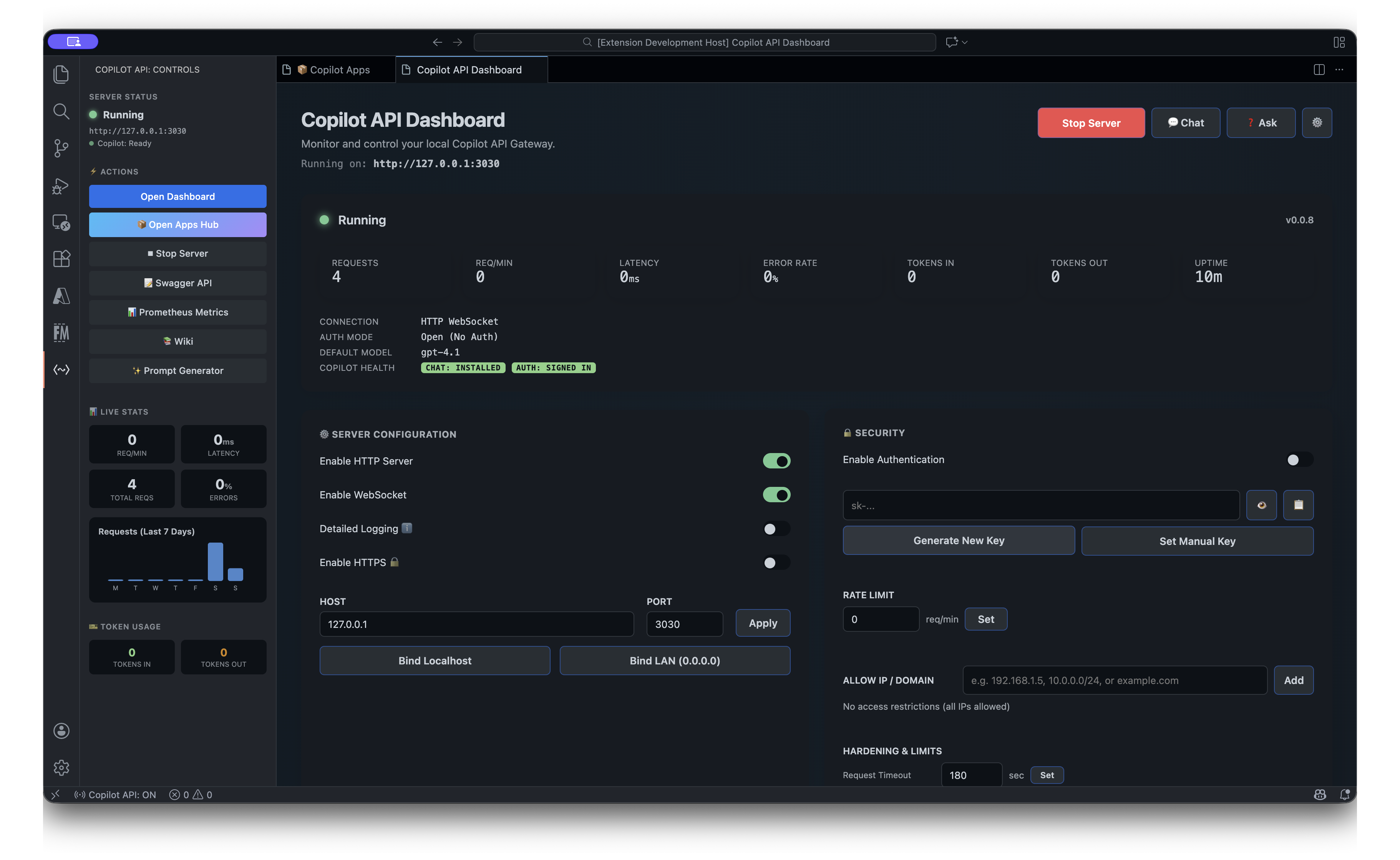
GitHub Copilot API Gateway on Visual Studio Marketplace
Here’s what this VS Code extension does:
- Exposes your Copilot subscription as a local HTTP server
- Compatible with OpenAI, Anthropic, and Google Gemini SDKs
- Includes enterprise-grade AI apps (Playwright test generator, code review, commit messages, and more)
- Supports Model Context Protocol (MCP) for connecting external tools
Basically, any application that works with OpenAI’s API now works with your Copilot subscription.
Stop Installing Ollama, LM Studio, and LocalLLM
I know you’ve been there.
You want to test some AI-powered automation. So you install Ollama. Then you realize you need a bigger model, so you download Llama 70B and watch your laptop catch fire. Or you try LM Studio, spend hours configuring quantization settings, and finally give up because the responses are… okay at best.
Here’s the truth:
GitHub Copilot gives you access to GPT-4 and Claude — the same models that power ChatGPT and Claude.dev. You’re already paying for world-class AI. You just couldn’t access it programmatically.
Until now.
# This is all you need
curl http://127.0.0.1:3030/v1/chat/completions \
  -H "Content-Type: application/json" \
  -d '{
    "model": "gpt-4o",
    "messages": [{"role": "user", "content": "Hello!"}]
  }'
No downloads. No GPU requirements. No configuration. It just works.
The Enterprise Apps Hub: AI Tools Built Right Into VS Code
But I didn’t stop at the API. I built a complete suite of AI apps that run directly in VS Code.
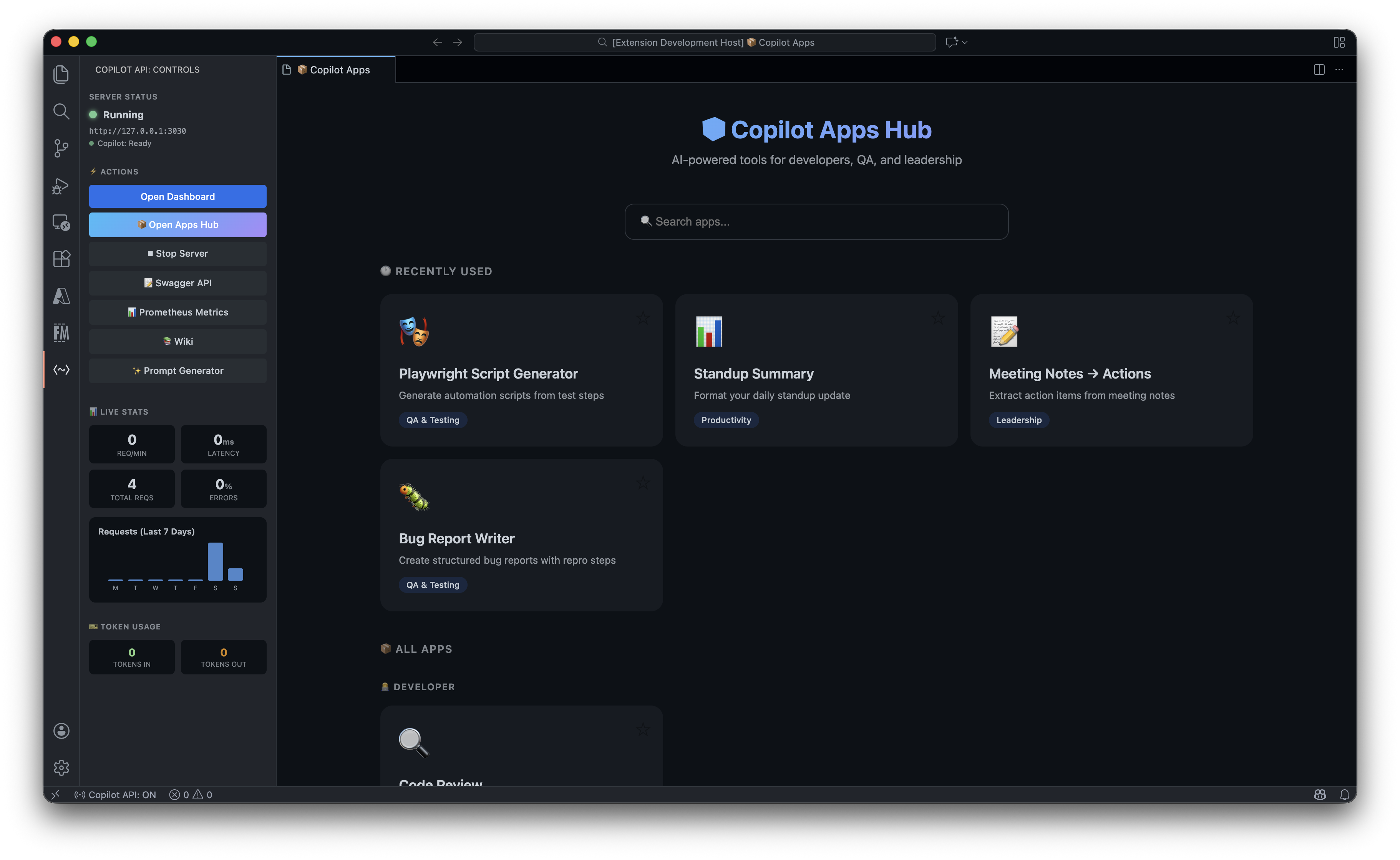
🎭 Playwright Script Generator
This one is my favorite. Describe your test in plain English:
“Login to the app with username ‘admin’ and password ’test123’. Navigate to the dashboard. Verify the stats card shows ‘Active Users: 42’. Take a screenshot.”
Click a button. Get a complete Playwright project:
📁 my-playwright-tests/
├── package.json           # All dependencies configured
├── playwright.config.ts   # Browser settings, reporters, screenshots
└── tests/
    └── test.spec.ts       # Production-ready test code
Then run it:
npm install
npx playwright install
npx playwright test
I’ve used this to generate hundreds of E2E tests. It saves hours. Sometimes days.
Other Apps Included
- 🔍 Code Review Assistant — Get AI feedback on your Git diffs
- 📝 Commit Message Generator — Semantic commits in seconds
- 📖 Documentation Generator — Auto-docs for any codebase
- ⚡ Quick Prompt — Fast AI responses without leaving your editor
- ✨ Code Improver — Refactoring suggestions that actually make sense
How This Saves Enterprises Real Money
Let’s do the math.
Typical Enterprise AI Costs
| Service | Monthly Cost (per developer) |
|---|---|
| ChatGPT Team | $25/user |
| OpenAI API | $50-200 (variable) |
| Anthropic API | $50-200 (variable) |
| GitHub Copilot | $10/user |
| Total | $135-435/user |
With This Extension
| Service | Monthly Cost |
|---|---|
| GitHub Copilot | $10/user |
| Total | $10/user |
For a team of 50 developers, that’s potentially $20,000/month in savings.
And you get:
- Full API compatibility
- Enterprise security (IP allowlisting, rate limiting, data redaction)
- Built-in AI apps
- MCP tool integration
Integration Examples That Actually Work
I’ve tested these. They work. Copy-paste them into your projects.
LangChain
from langchain_openai import ChatOpenAI

llm = ChatOpenAI(
    base_url="http://127.0.0.1:3030/v1",
    api_key="not-needed"
)

response = llm.invoke("Write a haiku about debugging")
print(response.content)
LlamaIndex RAG Pipeline
from llama_index.llms.openai import OpenAI
from llama_index.core import VectorStoreIndex, SimpleDirectoryReader

llm = OpenAI(
    api_base="http://127.0.0.1:3030/v1",
    api_key="not-needed"
)

documents = SimpleDirectoryReader("./docs").load_data()
index = VectorStoreIndex.from_documents(documents, llm=llm)
query_engine = index.as_query_engine()

response = query_engine.query("What does this codebase do?")
print(response)
AutoGPT / Autonomous Agents
export OPENAI_API_BASE=http://127.0.0.1:3030/v1
export OPENAI_API_KEY=not-needed

# Now run AutoGPT, MetaGPT, BabyAGI, or any agent
python -m autogpt
CrewAI Multi-Agent
from crewai import Agent, Task, Crew
from langchain_openai import ChatOpenAI

llm = ChatOpenAI(
    base_url="http://127.0.0.1:3030/v1",
    api_key="not-needed"
)

researcher = Agent(
    role="Senior Researcher",
    goal="Discover breakthrough insights",
    llm=llm
)

writer = Agent(
    role="Technical Writer",
    goal="Create compelling technical content",
    llm=llm
)

# Your crew runs on Copilot
crew = Crew(agents=[researcher, writer], tasks=[...])
result = crew.kickoff()
Interactive API Documentation
Full Swagger UI included. Test every endpoint live.
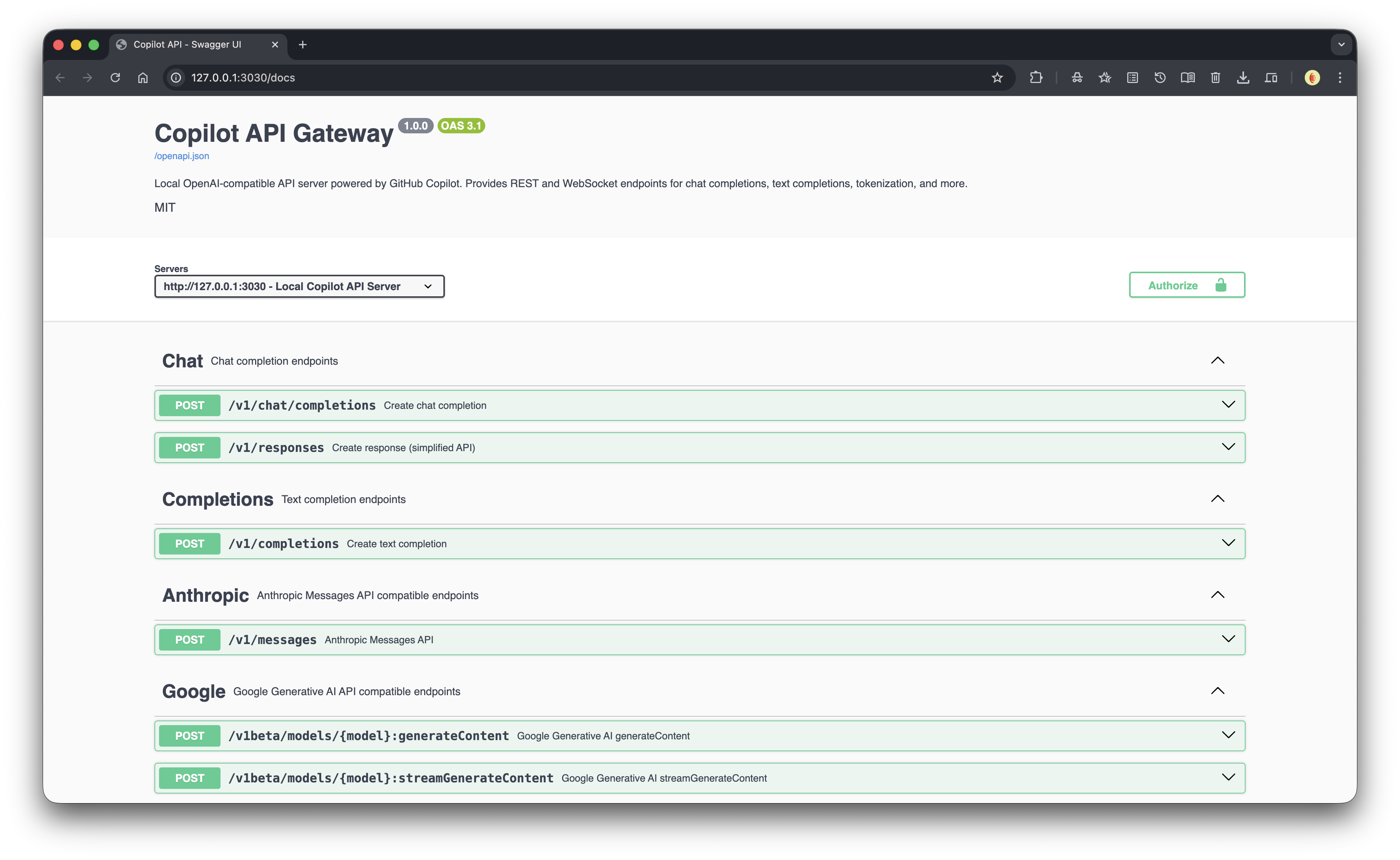
Visit http://127.0.0.1:3030/docs and try it yourself.
How to Install (Takes 2 Minutes)
Step 1: Install the Extension
Search “GitHub Copilot API Gateway” in VS Code, or run:
ext install suhaibbinyounis.github-copilot-api-vscodeStep 2: Start the Server
- Open the Copilot API sidebar
- Click ▶ Start Server
- Server runs at
http://127.0.0.1:3030
Step 3: Use It
Option A: API
Point any OpenAI-compatible client to http://127.0.0.1:3030/v1:
from openai import OpenAI

client = OpenAI(
    base_url="http://127.0.0.1:3030/v1",
    api_key="not-needed"
)

response = client.chat.completions.create(
    model="gpt-4o",
    messages=[{"role": "user", "content": "Hello!"}]
)
Option B: Apps Hub
Click 📦 Open Apps Hub and use the built-in AI apps.
Build Products, Not Just POCs
Here’s my challenge to you:
Stop treating AI as a toy. Start building products.
With this extension, you have:
- Zero API costs beyond your $10 Copilot subscription
- Production-quality models (GPT-4, Claude)
- Local-first architecture (runs on your machine, no data leaves)
- Full SDK compatibility (works with every AI framework)
Product Ideas You Can Build This Weekend
- AI-Powered Code Review Bot — Use the API to review PRs in your CI/CD pipeline
- Documentation Generator Service — Sell auto-docs as a SaaS
- Custom ChatGPT for Your Codebase — RAG pipeline with your docs
- Test Automation Service — Generate Playwright tests for clients
- Commit Message Enforcer — CI job that generates semantic commits
- AI Writing Assistant — Build a Notion alternative with AI built-in
The infrastructure is free. The models are world-class. What you build is up to you.
Security for the Paranoid (Like Me)
I built enterprise-grade security because I’m paranoid about data:
- IP Allowlisting — Only specific IPs can access the API
- Bearer Token Auth — Require an API key
- Data Redaction — Automatically mask sensitive data in logs
- Rate Limiting — Prevent abuse
- Connection Limits — Control concurrent requests
- Request Timeouts — No hanging connections
- Payload Limits — Prevent oversized requests
Configure in your VS Code settings:
{
  "githubCopilotApi.server.apiKey": "your-secret-key",
  "githubCopilotApi.server.ipAllowlist": ["192.168.1.0/24"],
  "githubCopilotApi.server.rateLimitPerMinute": 60
}
What People Are Building
I’ve seen developers use this for:
- Automated code reviews in GitHub Actions
- RAG pipelines for internal documentation
- Multi-agent systems for research automation
- Telegram bots that answer questions about their codebase
- Internal tools that replace expensive SaaS products
- E2E test generation at scale
The best part? They’re all running on their existing Copilot subscription. No extra costs.
Like It? Help Me Spread the Word
I built this because I was frustrated. I didn’t want to keep paying for AI services I already had access to. Now I’m sharing it so you don’t have to either.
If this saves you money or makes your life easier:
- ⭐ Star the repo — https://github.com/suhaibbinyounis/github-copilot-api-vscode
- Share this post — Tweet it, post it on LinkedIn, send it to your team
- Leave a review — On the VS Code Marketplace
- Build something cool — And tell me about it
Links
- VS Code Marketplace: Install Now
- GitHub: suhaibbinyounis/github-copilot-api-vscode
- My Website: suhaibbinyounis.com
Conclusion
You’re already paying for Copilot. You might as well use it for everything.
Stop paying for OpenAI API. Stop installing local LLMs. Stop configuring Ollama.
Install the extension. Start building.
ext install suhaibbinyounis.github-copilot-api-vscodeSee you on the other side.
— Suhaib